Frequently asked questions
Can't find the answer? Message us in the app's Chat menu or at info@takiapp.hu.
Booking
How far in advance do I need to book?
You can book just a few hours ahead, depending on free slots: the earliest start is 2 hours after booking. Slots starting within 48 hours carry an SOS surcharge, which the app shows before you book. We confirm every booking and send you a notification.
Where is Taki available?
In most districts of Budapest and in Budaörs. When you book, the app checks your postcode and tells you straight away whether your address is covered.
The time doesn't suit me any more. What should I do?
Send the new time in the app's Chat menu – our team will change it for you.
While your booking is still pending (not yet confirmed), you can cancel it in the app and get the full amount back, together with any coupon you used. Cancelling a confirmed booking is up to our team – message us in the chat.
How long does a cleaning take?
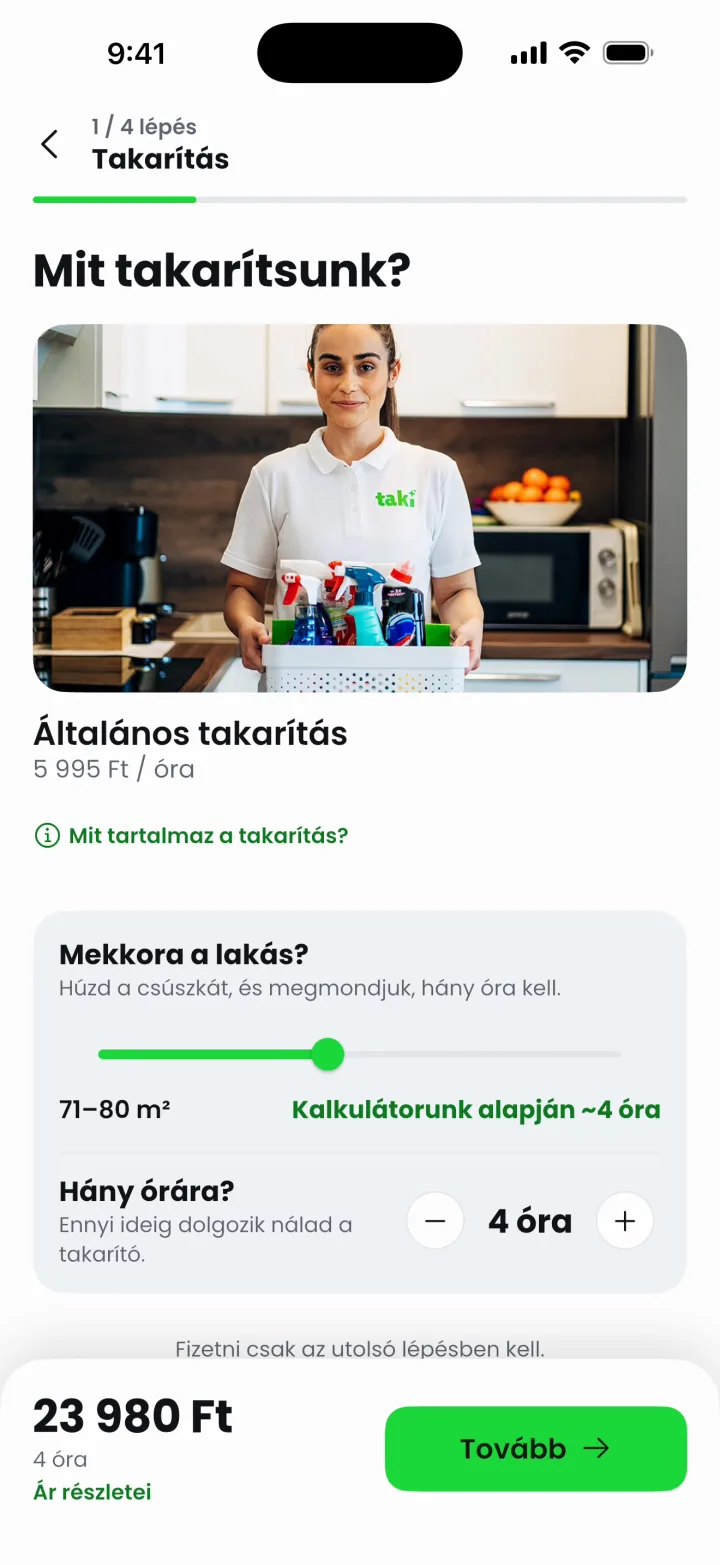
As many hours as you book. The app suggests the hours based on the size of your home, and the time for extras is added automatically. You see the exact duration before you confirm.
Can I add extras after booking?
Yes. Message us in the Chat menu: you can still choose extras and ask for extra time. You can pay for both right in the chat, just like the booking. Please don't give your cleaner more tasks on site than you booked – always arrange it with us.
I loved my last cleaner. Can I have them again?
Every Taki cleaner has a name and profile photo in the app, and you can rate them after each visit. If you'd like the same person next time, tell us in the chat after booking – we'll do our best. We're working on letting you request this in a few taps.
I want a different flat cleaned. How do I add a new address?
When booking, tap the address on the summary screen to pick a saved address or add a new one. You can save as many as you like.
How do I book regular cleaning?
Recurring cleaning – weekly, every two weeks or monthly, with a series discount – is coming to the app soon. Until then you can book each visit separately.
About the cleaning
I won't be at home during the cleaning. What should I do?
No problem. When booking, write the door code and where to find the key (for example, with a neighbour) in the “How do we get in?” field. Only the assigned cleaner sees it, from the day before the cleaning until the job is done. Your cleaner locks up afterwards and returns the key as agreed.
What cleaning products should I provide?
For general cleaning we use your products: microfibre cloths, paper towels, a dish sponge, floor cleaner, bathroom limescale remover, glass cleaner and degreaser, plus a mop and a vacuum cleaner. If something is missing, ask your cleaner to bring products or equipment when you book – the prices are on the price list. For deep cleaning we bring professional products and tools.
What about windows and balconies?
Our cleaners' safety matters as much as your satisfaction. If there's no other way, your cleaner only cleans the inside of the windows and never climbs out to dangerous heights. On the balcony they mop and dust, and wipe the outside of the railing only if they don't have to lean out.
Do you clean stairwells, offices or other spaces?
At the moment we clean homes only. If that changes, we'll announce it here and in the app.
I paid for an extra I no longer need. What now?
We can't refund single items afterwards, because the invoice covers the whole booking. While your booking is pending, you can cancel it in the app (with a full refund) and book again with the right extras.
Payment and invoices
How can I pay? Is cash possible?
You pay in the app by card, Apple Pay or Google Pay – the booking is confirmed with the payment. Cash payment is not possible.
How do I use a coupon code?
Enter the code on the summary screen when booking. The app shows the discount straight away, or what's still missing to use it.
Where can I find my invoice?
We e-mail the invoice to your account's e-mail address after every booking.
Account, safety, contact
How do I sign up?
Download the app from the App Store or Google Play, and sign up with your e-mail address, Google or Apple account.
Why is it safe to book cleaning through Taki?
It was the first question we asked ourselves – after all, you're letting us into your home. Every Taki cleaner is hired after a thorough selection: people we'd happily let into our own homes.
You can reach us any time in the app chat, and you get a notification when we set off, arrive and finish. Our cleaners are trained not to touch valuables left out, only to clean around them – if there's anything we should take extra care of, just tell us.
What if something goes wrong with the service?
Message us in the app's Chat menu. We handle every situation as quickly as we can.
How can I contact you?
In the app's Chat menu, by e-mail at info@takiapp.hu, or on Instagram, Facebook and TikTok at @taki_hungary.
Free download
Experience Taki.
Get the app and book your first cleaning in a few taps.


Free · iPhone and Android